冻冻网络智能客服系统
冻冻网络智能客服系统
基于 LangGraph + Ollama 的企业级智能客服系统,支持商品查询、订单查询、售后进度查询、烹饪指南等功能。
git地址
https://github.com/zxliucn/Customer_Services
目录
1. 项目概述
冻冻网络智能客服是一个基于 LangGraph 构建的企业级对话系统,采用多节点协作架构,支持:
| 功能 | 说明 |
|---|---|
| 📦 商品查询 | 价格、规格、库存 |
| 🚚 订单查询 | 订单状态、物流进度 |
| 💰 售后进度 | 退款/退货/换货进度 |
| 🍳 烹饪指南 | 食材做法食谱 |
| 👨💼 转人工 | 投诉等复杂问题转人工 |
核心特性:
- 🎯 意图识别 + 规则匹配混合决策
- 🔧 工具调用:订单/商品/售后数据库查询
- 📚 RAG 检索:用户手册 + 烹饪指南
- 💾 多轮对话记忆 (MemorySaver)
- 🏷️ 游客/登录用户区分
2. 技术架构
┌─────────────────────────────────────────────────────────────┐
│                     FastAPI 入口                           │
│                   /chat, /health                          │
└─────────────────────────┬───────────────────────────────────┘
                          │
┌─────────────────────────▼───────────────────────────────────┐
│                  LangGraph Agent                           │
│  ┌──────────┐    ┌──────────┐    ┌──────────┐           │
│  │  Intent  │───▶│  Router  │───▶│  Nodes   │           │
│  │ 意图识别  │    │  路由    │    │  执行    │           │
│  └──────────┘    └──────────┘    └──────────┘           │
│                                           │               │
│         ┌─────────┬─────────┬─────────┬──┘               │
│         ▼         ▼         ▼         ▼                   │
│    ┌────────┐┌────────┐┌────────┐┌────────┐             │
│    │  Tool  ││  RAG   ││ Direct ││  Help  │             │
│    │工具调用 ││知识检索 ││直接回答 ││帮助信息 │             │
│    └────────┘└────────┘└────────┘└────────┘             │
│         │         │                                       │
│         └────┬────┘                                       │
│              ▼                                            │
│       ┌────────────┐                                      │
│       │  Generate  │                                      │
│       │  回答生成   │                                      │
│       └────────────┘                                      │
└─────────────────────────┬───────────────────────────────────┘
                          │
    ┌─────────────────────┼─────────────────────┐
    ▼                     ▼                     ▼
┌────────┐        ┌────────────┐        ┌──────────┐
│ MySQL  │        │  Chroma    │        │  Ollama │
│ 数据库  │        │ 向量数据库  │        │   LLM   │
└────────┘ └────────────┘ └──────────┘技术栈:
| 层级 | 技术选型 |
|---|---|
| 对话框架 | LangGraph |
| LLM | Ollama (dd_model) |
| Embedding | Qwen3-Embedding-0.6B |
| 向量库 | Chroma |
| 数据库 | MySQL |
| Web 框架 | FastAPI |
3. 项目结构
Customer_Services/
├── main.py                    # FastAPI 入口
├── requirements.txt           # 依赖
├── .env                      # 环境变量
│
├── config/                   # 配置模块
│   ├── settings.py          # 全局配置
│   ├── database.py         # 数据库连接
│   └── logging_config.py   # 日志配置
│
├── agent/                    # Agent 核心
│   ├── graph.py            # LangGraph 图定义
│   ├── state.py            # 状态定义
│   ├── llm.py             # LLM 配置
│   └── node/              # 节点实现
│       ├── intent.py       # 意图识别
│       ├── router.py       # 路由决策
│       ├── tool.py         # 工具调用
│       ├── rag.py          # RAG 检索
│       ├── generate.py     # 回答生成
│       ├── direct.py       # 直接回答
│       ├── help.py        # 帮助信息
│       └── human.py       # 转人工
│
├── tools/                    # 工具函数
│   ├── product_tools.py    # 商品查询
│   ├── order_tools.py      # 订单查询
│   ├── after_sale_tools.py # 售后查询
│   ├── extractors.py       # 信息提取
│   ├── user_tools.py       # 用户管理
│   ├── guest_tools.py      # 游客管理
│   ├── conversation_tools.py # 会话管理
│   └── message_tools.py    # 消息管理
│
├── rag/                      # RAG 系统
│   ├── retriever.py        # 检索器
│   └── data/               # 向量数据
│       ├── chroma_db/      # Chroma 向量库
│       ├── 冻品商城用户使用手册.md
│       └── 食材烹饪方式指南.md
│
├── data/                     # SQL 脚本
│   ├── dongdong_products.sql
│   ├── dongdong_orders.sql
│   ├── dongdong_after_sale.sql
│   └── other.sql
│
└── logs/                     # 日志目录
    ├── app_*.log
    └── error_*.log
4. 核心模块
4.1 入口文件 (main.py)
# 启动服务
uvicorn main:app --host 0.0.0.0 --port 8000核心接口:
| 接口 | 方法 | 说明 |
|---|---|---|
/health | GET | 健康检查 |
/chat | POST | 对话接口 |
/ | GET | 根路径信息 |
请求示例:
curl -X POST http://localhost:8000/chat \
  -H "Content-Type: application/json" \
  -d '{"message": "虾滑多少钱", "session_id": "test123"}'
4.2 Agent 图结构 (agent/graph.py)
def build_graph():
    graph = StateGraph(AgentState)

    # 添加节点
    graph.add_node("intent", intent_node)      # 意图识别
    graph.add_node("help", help_node)         # 帮助信息
    graph.add_node("tool", tool_node)         # 工具调用
    graph.add_node("rag", rag_node)           # RAG检索
    graph.add_node("generate", generate_node) # 生成回答
    graph.add_node("direct", direct_node)     # 直接回答
    graph.add_node("human", human_node)       # 转人工

    # 条件路由
    graph.add_conditional_edges("intent", route_by_intent, {...})

    return graph.compile(checkpointer=MemorySaver())
4.3 状态管理 (agent/state.py)
class AgentState(TypedDict):
    messages: Annotated[List[dict], add_messages]  # 对话历史
    intent: str                                    # 当前意图
    user_id: Optional[int]                         # 用户ID
    is_guest: bool                                 # 是否游客
    extracted_order_id: Optional[str]               # 提取的订单号
    extracted_product_name: Optional[str]           # 提取的商品
    extracted_after_sale_id: Optional[str]          # 提取的售后单号
    tool_result: Optional[str]                     # 工具返回结果
    rag_context: Optional[str]                     # RAG检索结果
    final_response: str                            # 最终回答
    need_human: bool                              # 是否需要转人工
4.4 LLM 配置 (agent/llm.py)
def get_llm(temperature: float = 0.3):
    return ChatOllama(
        base_url="http://localhost:11434",
        model="dd_model",
        temperature=temperature,
    )
5. 工具模块 (tools)
5.1 商品工具 (product_tools.py)
| 函数 | 功能 |
|---|---|
query_product(user_input) | 查询单个商品信息 |
search_products(keyword) | 关键词搜索商品 |
check_stock(product_name, quantity) | 检查库存 |
返回示例:
【虾滑】
商品ID: P001
价格: 29.9元/袋
库存: 100件 (有货)
保质期: 12个月
储存方式: -18°C冷冻
5.2 订单工具 (order_tools.py)
| 函数 | 功能 |
|---|---|
query_order(user_input, user_id, is_guest) | 查询订单详情 |
get_order_status(order_id) | 获取订单状态 |
get_user_orders(user_id, limit) | 获取订单列表 |
5.3 售后工具 (after_sale_tools.py)
| 函数 | 功能 |
|---|---|
query_after_sale_progress(user_input, user_id, is_guest) | 查询售后进度 |
query_refund_progress(order_id) | 查询退款进度 |
5.4 信息提取器 (extractors.py)
| 函数 | 功能 |
|---|---|
extract_order_id(text) | 提取订单号 |
extract_after_sale_id(text) | 提取售后单号 |
extract_product_name(text) | 提取商品名 |
extract_phone(text) | 提取手机号 |
extract_all(text) | 提取所有信息 |
正则模式:
# 订单号: O2025010006, DD202412340001
r'(?<![A-Za-z0-9])O\d{6,12}(?![A-Za-z0-9])'
r'(?<![A-Za-z0-9])DD\d{8,12}(?![A-Za-z0-9])'

# 售后单号: AS202412340001
r'AS\d{8,}'

# 手机号: 1[3-9]\d{9}
r'1[3-9]\d{9}'
5.5 用户与会话
| 模块 | 函数 | 功能 |
|---|---|---|
| user_tools | get_or_create_user() | 获取/创建用户 |
| guest_tools | generate_guest_id() | 生成游客ID |
| guest_tools | create_guest_session() | 创建游客会话 |
| conversation_tools | get_or_create_conversation() | 获取/创建会话 |
| conversation_tools | update_conversation_count() | 更新消息计数 |
| message_tools | save_message() | 保存消息 |
| message_tools | get_conversation_messages() | 获取历史消息 |
6. Agent 节点 (agent/node)
6.1 意图识别 (intent.py)
两层意图识别:
用户输入 → 规则匹配(rule_match) → LLM补充(llm_intent)意图类型:
| 意图 | 关键词 | 路由节点 |
|---|---|---|
| help | 你好、在吗、帮助 | help |
| product | 商品、价格、库存 | tool |
| order | 订单、快递、物流 | tool |
| after_sale | 退款、售后 | tool |
| cooking | 怎么做、怎么吃 | rag |
| manual | 怎么操作、流程 | rag |
| complaint | 投诉、生气 | human |
| chat | 闲聊 | direct |
6.2 路由 (router.py)
def route_by_intent(state: dict) -> str:
    routing = {
        "help": "help",
        "product": "tool",
        "order": "tool",
        "after_sale": "tool",
        "cooking": "rag",
        "manual": "rag",
        "complaint": "human",
        "chat": "direct",
    }
    return routing.get(intent, "direct")
6.3 工具调用 (tool.py)
def tool_node(state: dict) -> dict:
    intent = state.get("intent")

    if intent == "product":
        result = query_product(user_input)
    elif intent == "order":
        result = query_order(user_input, user_id, is_guest)
    elif intent == "after_sale":
        result = query_after_sale_progress(user_input, user_id, is_guest)

    return {"tool_result": result, ...}
6.4 RAG 检索 (rag.py)
def rag_node(state: dict) -> dict:
    if intent == "cooking":
        context = retriever.search_cooking(query, top_k=2)
    elif intent == "manual":
        context = retriever.search_manual(query, top_k=2)

return {"rag_context": context}向量集合:
| 集合名 | 用途 |
|---|---|
| cooking_guide | 烹饪指南 |
| user_manual | 用户手册 |
6.5 回答生成 (generate.py)
def generate_node(state: dict) -> dict:
    system_prompt = f"""你是{COMPANY_NAME}的智能客服...

{full_context}

用户问:{user_input}

请根据参考资料直接回答:"""

    response = llm.invoke([SystemMessage(content=system_prompt), ...])
    return {"final_response": response.content}
6.6 直接回答 (direct.py)
用于闲聊/问候,保持对话上下文记忆。
6.7 帮助信息 (help.py)
def get_help_message() -> str:
return f"""📖 **您好**
我是{COMPANY_NAME}智能助手**冻冻**,可以帮你:
📦 **查询商品** - 价格、规格、库存
🚚 **查询订单** - 订单状态、物流
💰 **售后进度** - 退款/退货进度
🍳 **烹饪指南** - 食材做法
👨💼 **转人工** - 需要人工服务
---
客服热线:{HOTLINE}"""6.8 转人工 (human.py)
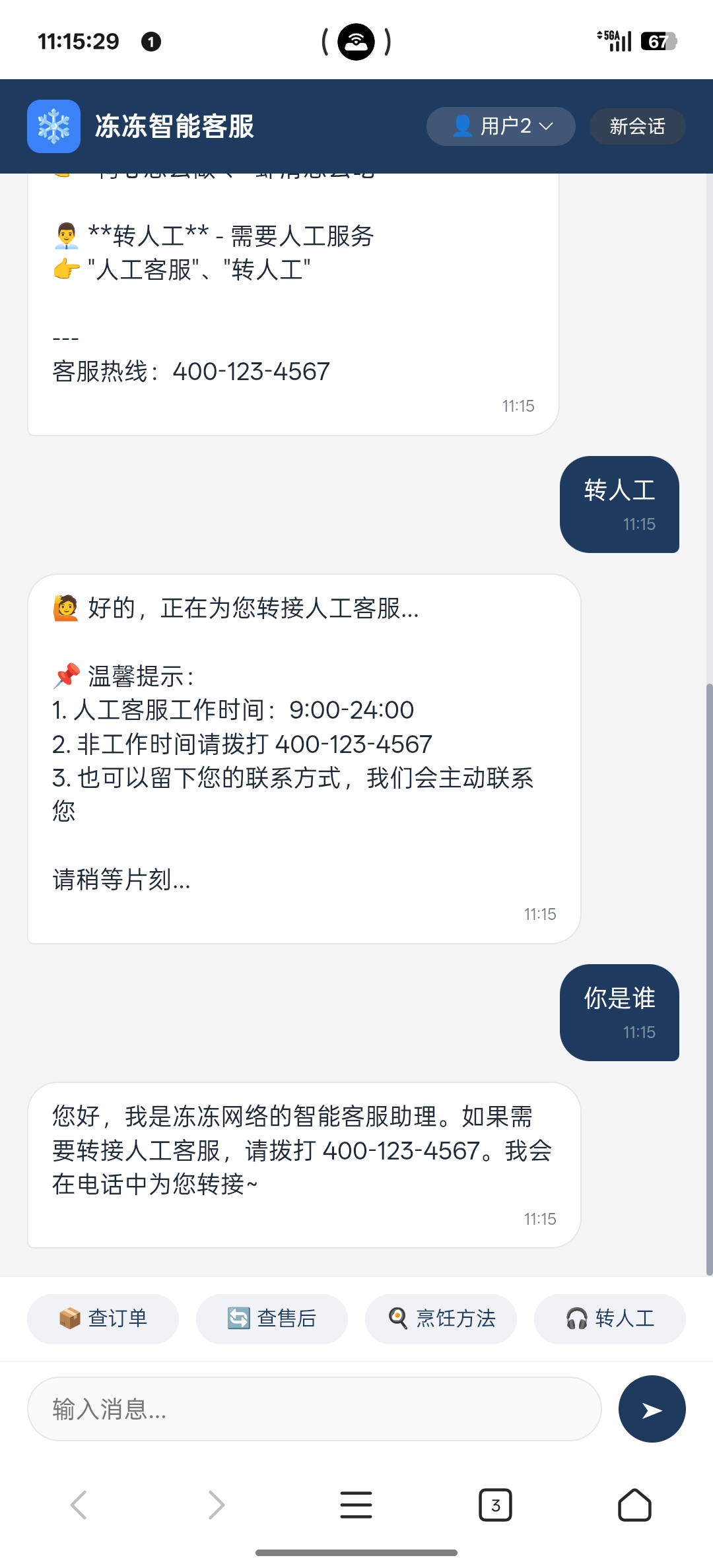
def human_node(state: dict) -> dict:
    return {
        "final_response": "🙋 好的,正在为您转接人工客服...",
        "need_human": True
    }
7. RAG 系统
检索器 (rag/retriever.py)
class RAGRetriever:
    def __init__(self, persist_dir="./rag/data/chroma_db"):
        self.embed_model = HuggingFaceEmbedding(
            model_name="Qwen/Qwen3-Embedding-0.6B",
            trust_remote_code=True
        )
        self.chroma_client = chromadb.PersistentClient(path=persist_dir)

    def search_cooking(self, query, top_k=2):
        """检索烹饪指南"""
        index = self._get_index("cooking_guide")
        return index.as_retriever(similarity_top_k=top_k).retrieve(query)

    def search_manual(self, query, top_k=2):
        """检索用户手册"""
        index = self._get_index("user_manual")
        return index.as_retriever(similarity_top_k=top_k).retrieve(query)
8. 配置说明
环境变量 (.env)
# Ollama 配置
OLLAMA_BASE_URL=http://localhost:11434
MODEL_NAME=dd_model

# Embedding 模型
EMBEDDING_MODEL_PATH=/Users/t-mac/.cache/.../Qwen3-Embedding-0.6B

# MySQL 数据库
MYSQL_HOST=localhost
MYSQL_PORT=3306
MYSQL_USER=root
MYSQL_PASSWORD=
MYSQL_DATABASE=frozen_shop

# API 配置
API_HOST=0.0.0.0
API_PORT=8000

# 日志
LOG_LEVEL=INFO
9. 数据库表结构
核心表
| 表名 | 用途 |
|---|---|
users | 用户信息 |
guest_sessions | 游客会话 |
conversations | 会话记录 |
messages | 消息历史 |
products | 商品信息 |
orders | 订单信息 |
order_items | 订单明细 |
after_sale | 售后记录 |
after_sale_item | 售后商品明细 |
10. 快速开始
安装依赖
pip install -r requirements.txt启动 Ollama
ollama serve
ollama pull dd_model
启动服务
python main.py
# 或
uvicorn main:app --host 0.0.0.0 --port 8000
启动成功后,访问 Web 界面
在浏览器中打开项目目录下的 talk.html:
# Mac 系统
open talk.html

# 或者直接用浏览器打开
# file:///Users/t-mac/workspace/AI/Customer_Services/talk.html界面功能:
- 👤 支持切换用户(游客、用户2、用户3、用户4)
- 💬 快捷按钮:查订单、查售后、烹饪方法、转人工
- 🔄 新会话按钮:重置对话历史
测试对话
curl -X POST http://localhost:8000/chat \
  -H "Content-Type: application/json" \
  -d '{"message": "虾滑多少钱", "session_id": "test123"}'
12. 项目预览
系统提供 Web 聊天界面,可直接在浏览器中与客服对话、查询商品和订单信息。
对话界面预览
图 1:智能客服主界面 — 支持自然语言商品查询与订单管理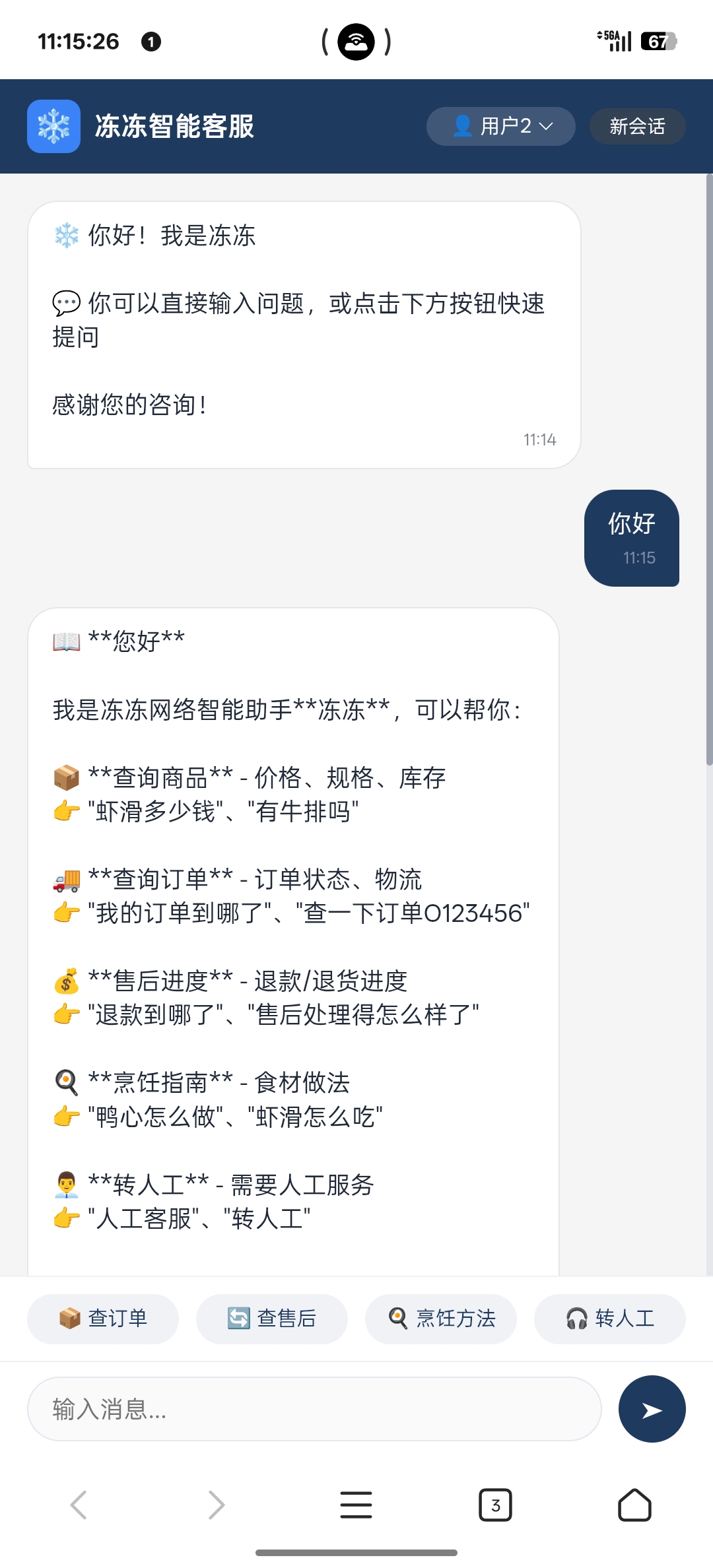
图 2:多轮对话与转人工功能 — 展示完整对话流程与售后处理
13. API 接口
健康检查
GET /health响应:
{
  "status": "healthy",
  "service": "冻冻网络",
  "version": "1.0.0"
}
对话接口
POST /chat
Content-Type: application/json

{
  "message": "虾滑多少钱",
  "session_id": "user_123"
}
响应:
{
  "response": "【虾滑】价格:29.9元/袋,库存:100件...",
  "session_id": "user_123",
  "intent": "product"
}
总结
本系统采用 LangGraph 状态图架构,通过意图识别 → 路由 → 节点执行 → 回答生成的流程,实现了一个功能完整的智能客服系统。核心亮点:
- 混合决策:规则匹配 + LLM 意图识别
- 工具驱动:数据库查询 (订单/商品/售后)
- RAG 增强:烹饪指南、用户手册知识库
- 可扩展:节点化设计,易于添加新功能